| Copyright © 2005-2008 SOBTEC, INC. Ephone: (954) 727-3992 Efax: (954) 206-6838 Email: contact@sobtec.net |
These are just a few of the reasons Fort Dox is the most affordable way to improve your business operations by
reducing hardcopy documents and the paper handling costs associated with managing them.
Scanning & Remote Scanning
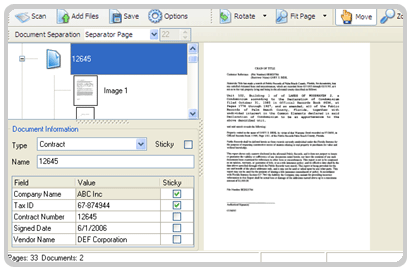
Fort Dox makes scanning your paper documents easy. Simply load in a single document or a stack of files and click
the scan button. Once your documents appear on the screen, key in your index fields, and save the documents to the
Fort Dox repository. Key features include:
Import from PC & Copy Machine/MFP
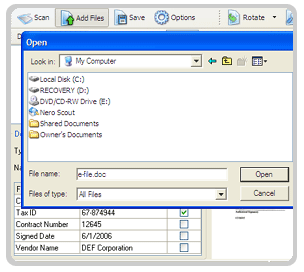
Fort Dox allows you to select electronic files on a local or network PC and store them in the Fort Dox repository. This is
a perfect way to manage Microsoft Office documents, PDFs, or even scanned images. In addition, if you currently use
your copy machine (MFP) to scan to a network directory, you can simply browse to this folder, select the file(s), and
upload them into Fort Dox. Once in Fort Dox, your files can be indexed, secured, shared, and backed-up.
Simple & Advanced Search
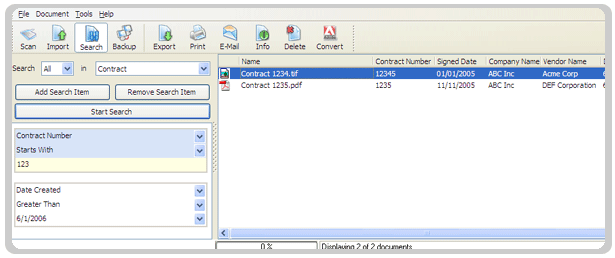
Finding your documents in Fort Dox is easy. You can use the simple search feature to type in a file name or partial
name to locate a file. For more advanced searches, Fort Dox offers the following features:
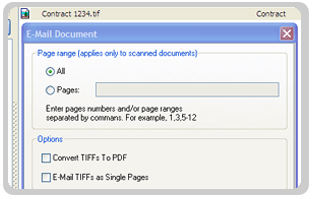
View, Email, & Print Documents
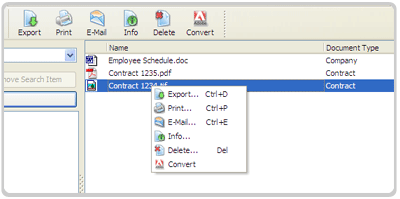
Fort Dox allows your business to operate more efficiently by allowing you to view files from anywhere at anytime from
your desktop. In addition, if you need to distribute a file, you can email the entire document or selected pages of a
document directly from Fort Dox.
Anywhere Anytime Access
With Fort Dox, your users will have secure access to documents from inside and outside the office. This makes Fort
Dox the ideal solution for businesses that have remote offices or telecommuting employees that need to access and
manage documents from a single, secure, searchable repository. No more calls to headquarters, costly long distance
faxes, or overnighting documents. Instead, Fort Dox empowers your employees by giving them access to the files they
need in seconds right from their computers.
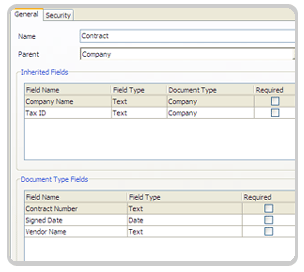
Document Types & Indexing
Fort Dox allows you to configure custom indexing templates called document types. Each document type can contain
any number of user-definable index fields. The fields can be setup for text, dates, or even as drop down lists. For
example, you can build a Contract Document Type that contains a Contract Number field, a Vendor Name field, and
a Contract Type drop down list.
You will choose your document type when you scan or import files into Fort Dox and when you search for files saved
in the system. Document types make it easy to index (tag) documents with the information you need to find them
quickly and efficiently.
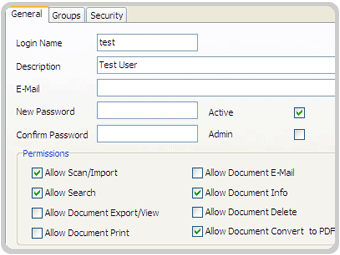
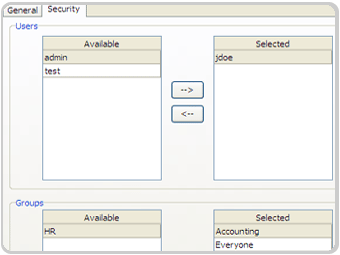
Users, Groups, & Security
Fort Dox makes configuring users and groups easy with its simple administration tool. Each user will have to login to
Fort Dox using a password. In addition, Fort Dox allows you to secure your documents by assigning users to the
specific document types you want them to have access to. With Fort Dox, you determine who has access to your
account and which documents they can view.
Exporting & Local Account Backups
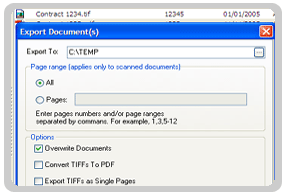
Need to download a document or multiple files from Fort Dox? Simply select the files and click export.
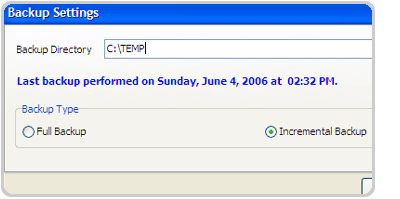
Want to backup your entire account? Not a problem. Use the account backup feature to select a directory and
perform a complete export of all of the files in your Fort Dox account. You can perform your backups as often as you
like to any of the following locations: a local folder, network folder, or removable media (hard drive or zip drive).
The Fort Dox account backup feature provides you with two levels of disaster readiness: One set of your files will be
stored at a secure data center and another locally at your office. Best of all, each time you run the backup, Fort Dox
will only perform an incremental export of information that has changed - expediting the process!
Automatic Account Updates
Your Fort Dox service fee includes all updates to the software. If an update is available, it will be automatically
installed when you login to Fort Dox. This makes updating your Fort Dox account effortless and assures your users are
always using the most current version of the software. No more messy desktop installations using CDs or having to
download updates manually from a website. Just login and go!
reducing hardcopy documents and the paper handling costs associated with managing them.
Scanning & Remote Scanning
Fort Dox makes scanning your paper documents easy. Simply load in a single document or a stack of files and click
the scan button. Once your documents appear on the screen, key in your index fields, and save the documents to the
Fort Dox repository. Key features include:
- Plug and Play compatibility with any scanner.
- The ability to scan from the office or remote locations to a single secure repository.
- The ability to insert, reorder, rotate, and remove individual pages of scanned documents.
- An easy to use indexing panel that offers a simple name field or custom document types for more advanced
indexing. - "Sticky" fields to save keystrokes when indexing parameters that carry over from document to document.
- Multiple document separation methods (Manual, Fixed Pages, and Barcode Separator Pages & Stickers) to tell
Fort Dox where a document begins and ends. - An add files button for rapidly importing electronic files from your PC or network server.
Import from PC & Copy Machine/MFP
Fort Dox allows you to select electronic files on a local or network PC and store them in the Fort Dox repository. This is
a perfect way to manage Microsoft Office documents, PDFs, or even scanned images. In addition, if you currently use
your copy machine (MFP) to scan to a network directory, you can simply browse to this folder, select the file(s), and
upload them into Fort Dox. Once in Fort Dox, your files can be indexed, secured, shared, and backed-up.
Simple & Advanced Search
Finding your documents in Fort Dox is easy. You can use the simple search feature to type in a file name or partial
name to locate a file. For more advanced searches, Fort Dox offers the following features:
- Search user-defined document types for specific index fields. For example, searching for invoices by PO
Number or contracts by Vendor Name. - The ability to conduct multiple searches simultaneously. For example, search for all contracts between March
and April belonging to the vendor ACME Corporation. - Search on specific criteria (equals, contains, less than, greater than, etc.)
- Search on date ranges.
View, Email, & Print Documents
Fort Dox allows your business to operate more efficiently by allowing you to view files from anywhere at anytime from
your desktop. In addition, if you need to distribute a file, you can email the entire document or selected pages of a
document directly from Fort Dox.
Anywhere Anytime Access
With Fort Dox, your users will have secure access to documents from inside and outside the office. This makes Fort
Dox the ideal solution for businesses that have remote offices or telecommuting employees that need to access and
manage documents from a single, secure, searchable repository. No more calls to headquarters, costly long distance
faxes, or overnighting documents. Instead, Fort Dox empowers your employees by giving them access to the files they
need in seconds right from their computers.
Document Types & Indexing
Fort Dox allows you to configure custom indexing templates called document types. Each document type can contain
any number of user-definable index fields. The fields can be setup for text, dates, or even as drop down lists. For
example, you can build a Contract Document Type that contains a Contract Number field, a Vendor Name field, and
a Contract Type drop down list.
You will choose your document type when you scan or import files into Fort Dox and when you search for files saved
in the system. Document types make it easy to index (tag) documents with the information you need to find them
quickly and efficiently.
Users, Groups, & Security
Fort Dox makes configuring users and groups easy with its simple administration tool. Each user will have to login to
Fort Dox using a password. In addition, Fort Dox allows you to secure your documents by assigning users to the
specific document types you want them to have access to. With Fort Dox, you determine who has access to your
account and which documents they can view.
Exporting & Local Account Backups
Need to download a document or multiple files from Fort Dox? Simply select the files and click export.
Want to backup your entire account? Not a problem. Use the account backup feature to select a directory and
perform a complete export of all of the files in your Fort Dox account. You can perform your backups as often as you
like to any of the following locations: a local folder, network folder, or removable media (hard drive or zip drive).
The Fort Dox account backup feature provides you with two levels of disaster readiness: One set of your files will be
stored at a secure data center and another locally at your office. Best of all, each time you run the backup, Fort Dox
will only perform an incremental export of information that has changed - expediting the process!
Automatic Account Updates
Your Fort Dox service fee includes all updates to the software. If an update is available, it will be automatically
installed when you login to Fort Dox. This makes updating your Fort Dox account effortless and assures your users are
always using the most current version of the software. No more messy desktop installations using CDs or having to
download updates manually from a website. Just login and go!
Software Characteristics

Document Management
 | |  | |  | |  |